DS PRO
- 3.7
- Rating
- 50.00K
- Installs
- Free
- Price

 Analysis by App-foxy
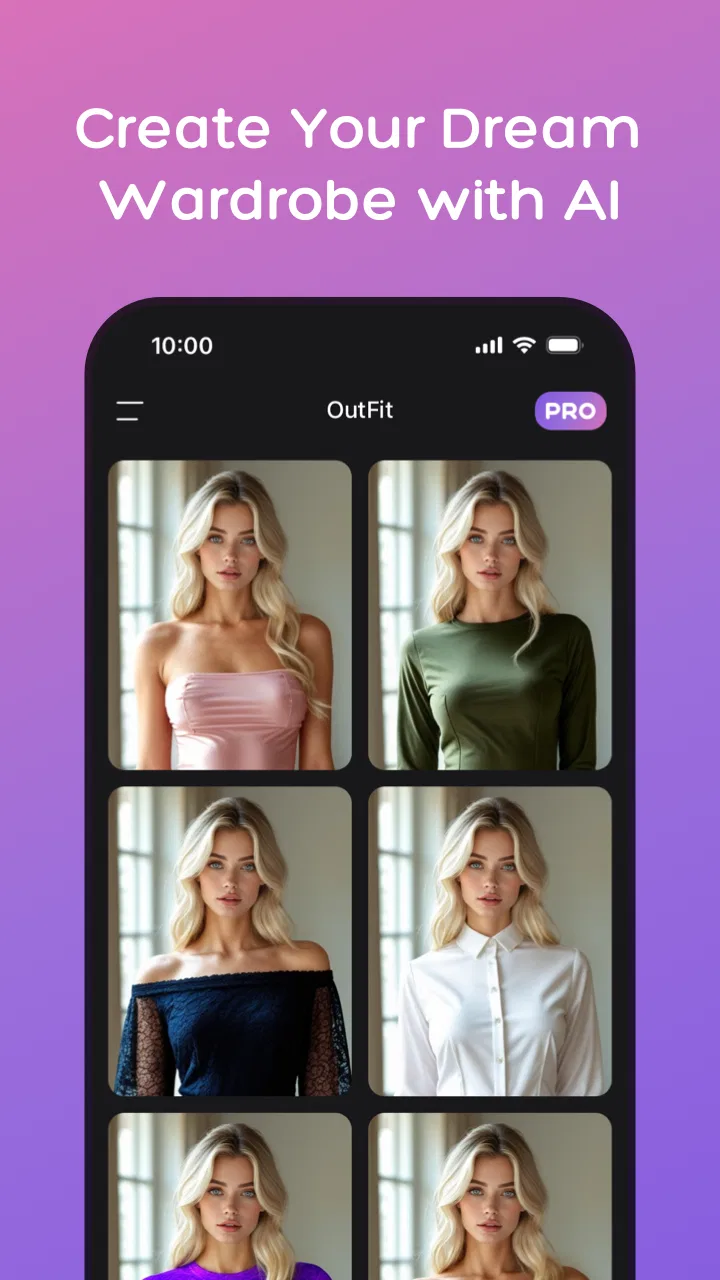
I approached DS PRO as a practical styling tool rather than a novelty camera effect. Developed by Meta Insight, this free Android app sits in the tools category and focuses on AI-assisted outfit and hairstyle previews. Its central idea is easy to understand: give yourself a visual starting point before changing your look, shopping for clothes, or asking a stylist for advice. In my experience, that makes it more useful for exploring possibilities than for making a final decision.
The app is aimed at people who want a quick visual experiment without immediately committing to a haircut, new color, or unfamiliar outfit. It has an Everyone content rating, works on Android devices running version 6.0 or later, and has reached over fifty thousand installs. Those details suggest a relatively accessible tool, although the modest average rating of 3.7 from roughly 250 ratings also tells me that the experience will not suit every phone, photo, or expectation.
What DS PRO does well when you use it as a styling sketchbook
The strongest part of the concept is the ability to think visually. Describing a hairstyle to yourself is surprisingly difficult, and clothing combinations can look very different in a mirror than they do in your imagination. A virtual try-on tool gives me something concrete to react to. Even when the result is not perfectly realistic, it can answer a useful first question: “Is this general direction worth exploring?”
You May Also Like

 Pandora - Music & Podcasts
Pandora’s Music Is Easy to Start, but Harder to Recover
Pandora’s strength is its low-effort path from a seed to a station. Its weak spot is how much confidence it asks you to place in connection, setup, and quiet recovery.

 AccuWeather: Weather Radar
AccuWeather Review: A Quick, Clear Forecast for Everyday Decisions
For everyday plans, the best forecast is the one you can understand quickly. AccuWeather makes rain timing, radar, and local conditions easy to act on, with a few trade-offs.

 Hill Climb Racing
Why Hill Climb Racing Still Turns Crashes Into One More Run
A tiny car, a bumpy hill and one more upgrade: Hill Climb Racing keeps resurfacing because its simple chaos makes every near-miss feel personal.

 AliExpress - Shopping App
AliExpress Makes Global Shopping Feel Personal, but Shoppers Bear the Risk
AliExpress turns a global marketplace into a pocket-sized discovery engine. Its reach is useful, its shopping loop compelling, and its trade-offs easy to miss.

 Lords Mobile: Kingdom Wars
Lords Mobile Is a Kingdom-Building Routine, Not a Quick Match
A case-by-case verdict on the building, battles, device demands, and social commitments that make Lords Mobile rewarding for some players and exhausting for others.

 PDF Scanner app - TapScanner
TapScanner Makes Paperwork Easier to Capture, Check, and Share
TapScanner makes scanning with a phone feel less like a rescue operation and more like a dependable step in getting work done. Its capture tools are useful, though not flawless.
More From Our News Desk
View All News


I find that distinction important. I would not treat an AI preview as a promise of how I will look after a salon appointment. I would use it to narrow a broad choice into a few candidates. For example, if I am deciding between keeping my current length and trying a shorter shape, a preview can help me notice which option feels closer to my personal style. That is a more realistic benefit than expecting a flawless simulation.
The outfit side can also help during everyday planning. Someone preparing for a casual event might use the app to compare a few ideas before opening the wardrobe. A person returning to work after a long break could use it to explore a more polished appearance without buying anything first. The value is not only the generated image; it is the conversation the image starts. I can show a friend, compare two directions, and identify what I actually like instead of shopping blindly.
One useful habit is to begin with a clear goal rather than making random transformations. I would first decide whether I am testing a silhouette, a hairstyle, or an overall mood. Trying to judge all of those at once makes the result harder to interpret. A preview that looks wrong may be revealing a poor combination rather than an unsuitable hairstyle, so separating the questions produces a more useful experiment.
Another practical tip is to treat the first output as a draft. If the image feels almost right but not quite convincing, I would compare it with the original and focus on one visible difference at a time. Is the hair shape appealing but the outfit distracting? Is the clothing idea good while the face or proportions look artificial? This approach helps prevent the common mistake of rejecting a genuinely good idea because the rendering is imperfect.
DS PRO is also appealing because it lowers the social pressure around trying something new. Asking a stylist for a dramatic change can feel intimidating when I am not even sure what I want. A private preview lets me arrive with a clearer description, such as wanting a softer outline, a more structured look, or a different level of formality. It does not replace professional advice, but it can make that conversation more efficient.
Where the visual previews need a careful reading
AI styling images are best understood as suggestions, not measurements. Hair texture, lighting, face shape, fabric behavior, and camera angle all affect the final appearance in real life. A hairstyle that seems flattering in a still image may require daily maintenance, particular products, or a different cut to reproduce. Likewise, an outfit preview may communicate a color relationship while failing to show how the material feels, fits, or moves.
That limitation matters most when the decision involves money or a permanent change. I would never use one generated image as the only reason to book an expensive color treatment or purchase a complete wardrobe. Instead, I would use DS PRO to create a shortlist, then check real examples, consult a stylist, or try comparable items in person. The app is strongest before the decision, not at the point where accuracy is essential.
Photo choice makes a noticeable difference to the usefulness of any try-on workflow. A clear, front-facing image with the subject easy to distinguish from the background gives the app a better starting point than a dark group photo or a heavily filtered selfie. I would also avoid judging results from a picture with an unusual head tilt, because the preview can exaggerate the mismatch between the source image and the proposed style.
This gives DS PRO a less obvious strength: it encourages better decision-making when used in a sequence. I would save the original image, create one controlled variation, compare it, and then move to the next idea. That process is more informative than generating many unrelated looks and scrolling through them quickly. The app becomes a small visual testing bench rather than a stream of disposable effects.
There is also a trade-off between convenience and confidence. A fast preview is useful precisely because it is easy, but that ease can make the result feel more authoritative than it deserves. The polished appearance of an AI image may tempt users to overlook practical issues such as maintenance, comfort, dress codes, weather, or whether the suggested look fits their existing wardrobe. I think the app works best when I deliberately add those real-world checks after the visual experiment.
The main weakness is the gap between inspiration and dependable simulation
The clearest weakness is that the app’s promise can be interpreted too broadly. “Try on” sounds more precise than what an AI concept preview can usually guarantee. If I expect a highly accurate representation of how a cut, color, or outfit will look on my body, I may be disappointed. The result can be useful while still changing facial details, proportions, hair behavior, or clothing structure in ways that would not happen outside the screen.
That gap is especially important for users who need reliable fit information. DS PRO cannot, by itself, tell me whether a garment will pinch at the shoulders, sit correctly at the waist, or work with shoes I already own. It also cannot replace a hair professional’s assessment of what is technically possible with my current hair. For those needs, a fitting room, a retailer’s detailed size guidance, or a consultation is the better tool.
The app’s rating of 3.7 indicates a mixed experience overall, and I think that is consistent with the nature of this category. Visual AI tools can feel impressive in one attempt and less convincing in another. Results depend on the source image and on how closely the requested style matches the person in it. Anyone installing the app should approach it with curiosity rather than assuming every output will be polished enough to share or use as a reference.
There is another point worth considering before spending time with it: the app is free to install, but it includes in-app purchases ranging from about twenty dollars to nearly 280 dollars per item. That is a wide range, and it changes how I would recommend approaching the experience. I would explore the free portion carefully and think about the value of any paid option before confirming a purchase. A single attractive preview is not automatically worth a substantial cost.
The version available for review is 1.2.2, and the app was released on March 3, 2025. Because it is a relatively recent product, I would keep expectations realistic about polish and consistency. Newer tools can improve quickly, but they may also have rough edges in navigation, output quality, or the way different devices handle image processing. I would judge it by whether it helps me make a better styling decision, not by expecting the maturity of a long-established professional platform.
Privacy-minded users should also make a deliberate choice about the photographs they use. I would avoid uploading images containing other people, sensitive backgrounds, or anything I would not want processed by a third-party service. That is not a criticism unique to DS PRO; it is a sensible rule for any app that works with personal photos. Keeping a separate, simple test image can make experimentation feel more controlled.
Who should use it, and who should choose another route?
I think DS PRO is a good fit for someone who enjoys experimenting with appearance but wants a low-pressure first step. It is particularly suitable for a person preparing for a change and struggling to explain what they want. It can also help a wardrobe planner compare broad ideas, or help a friend group discuss whether a certain style feels too formal, too dramatic, or close to the desired look.
It is less suitable for a user who needs exact shopping guidance. If the main question is whether a specific brand’s garment will fit, a retailer’s measurement tools and real customer photographs are more useful. If the main question is whether a haircut will work with a particular curl pattern or hair condition, a qualified stylist can provide information that a generated image cannot. In those situations, DS PRO may still inspire ideas, but it should not be the primary decision tool.
I would also skip it if I dislike experimenting with generated images or if I want a simple catalog of clothes already in my closet. This is not the same as a traditional wardrobe organizer, a shopping comparison service, or a professional salon consultation. Its role is narrower and more imaginative: it helps turn a vague appearance idea into something visible.
A realistic use case would be preparing for a job interview. I might take a clean photo, test a more structured outfit direction, and compare it with a hairstyle that feels tidy without being too severe. Then I would inspect what I already own, check the dress expectations, and adjust the idea to something comfortable. The app would not decide the outfit for me; it would help me avoid arriving at the interview with an untested combination.
For a wedding guest, the workflow would be different. I would use it to explore formality and color balance, then verify the venue, season, and comfort requirements. For a haircut appointment, I would bring a couple of the most useful previews as conversation starters while accepting that the stylist may recommend a modified version. These examples show where the app earns its place: it supports preparation, rather than pretending to replace judgment.
My best practical advice is to compare ideas by questions, not by which image looks most dramatic. Ask whether the look matches your routine, whether you can maintain it, whether it works with clothes you already have, and whether you would still choose it without the novelty of the preview. That final test is valuable because AI styling can make an unusual change feel exciting for a moment without proving that it belongs in everyday life.
Meta Insight has made a tool with a clear and approachable purpose, and I appreciate that it can make appearance planning less abstract. Still, the experience depends heavily on how the user interprets the images. The app rewards patience, comparison, and a willingness to treat each result as an idea. It is not the right choice for anyone demanding exact fit, guaranteed realism, or expert technical advice.
For me, DS PRO is most convincing as a private visual sketchbook for outfit and hairstyle decisions. It is free to start, accessible to a broad Android audience, and capable of making a vague style thought easier to discuss. The mixed rating and the substantial range of optional purchases are reasons to proceed carefully, not automatic reasons to dismiss it. I would recommend trying it with a good photo, testing one change at a time, and using the results to guide real-world checking.
If you want inspiration before a salon visit, a shopping trip, or an important event, this app is worth exploring. If you need certainty about fit, maintenance, or professional feasibility, I would choose a specialist or a real-world try-on instead. That is the honest boundary of the experience: use it to discover possibilities, not to outsource the final decision.
FAQs for DS PRO
01What is DS PRO, and what can I use it for?
DS PRO is designed as a practical mobile application for users who want to access its main tools and content from an Android or iOS device. After installing it, you can explore the available sections, adjust the options to your preferences, and use the app through its mobile interface. The exact experience may depend on your device, operating-system version, and the features enabled by the developer.
02Is DS PRO free to download and use?
DS PRO may be available to download at no initial cost, but users should check the official Google Play Store or Apple App Store listing before installing it. Some versions of an app can include advertising, optional purchases, subscriptions, or features that require an account. Reviewing the store description, pricing details, and in-app purchase information is the safest way to understand the complete cost.
03Which devices are compatible with DS PRO?
Compatibility depends on the version of DS PRO and the requirements published by its developer. Before downloading, check whether your Android or iPhone meets the required operating-system version and has enough free storage space. Performance can also vary between devices, particularly on older phones. Keeping your operating system and the application updated may help prevent crashes or missing features.
04Does DS PRO require an internet connection or user registration?
The need for an internet connection depends on which parts of DS PRO you want to use. Basic screens or previously loaded information may work offline, while synchronization, online content, account services, updates, or other connected features may require Wi-Fi or mobile data. Registration may also be requested for personalized functions, so review the permissions and sign-in requirements during setup.
05Is DS PRO safe to install and what permissions should I review?
Download DS PRO only from a trusted official store and verify the developer name, ratings, update history, and privacy information before installation. During setup, carefully review permissions for storage, notifications, location, camera, microphone, or other device features. Grant only access that appears necessary for the app’s functions, and avoid unofficial modified versions that could create security or privacy risks.
Pros
- Clear interface makes vehicle diagnostics easy to follow.
- Supports live data monitoring for more detailed troubleshooting.
- Can help identify problems before visiting a repair shop.
- Useful for checking whether a warning light needs urgent attention.
- Portable solution that works with compatible mobile devices.
Cons
- Requires a compatible vehicle and diagnostic adapter to function.
- Some advanced features may depend on the connected hardware.
- Diagnostic readings can be confusing without basic automotive knowledge.
- Compatibility may vary across vehicle makes
- models
- and years.
- Bluetooth or Wi-Fi connection issues can interrupt scanning sessions.

DS PRO
Gallery